Open Source v0.2.0 is out — what's new

Any app on your Mac,
read aloud.

A macOS menu bar app that reads text aloud from any application. Focus a window, press ⌘⇧L, and listen.

Download for macOS View Source
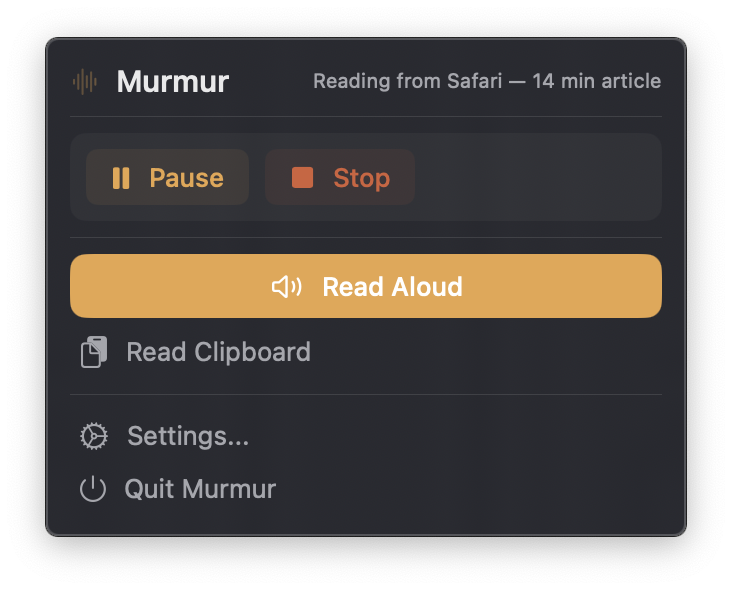
Murmur menu bar widget showing play, pause, and stop controls while reading from Safari
Reading from Safari
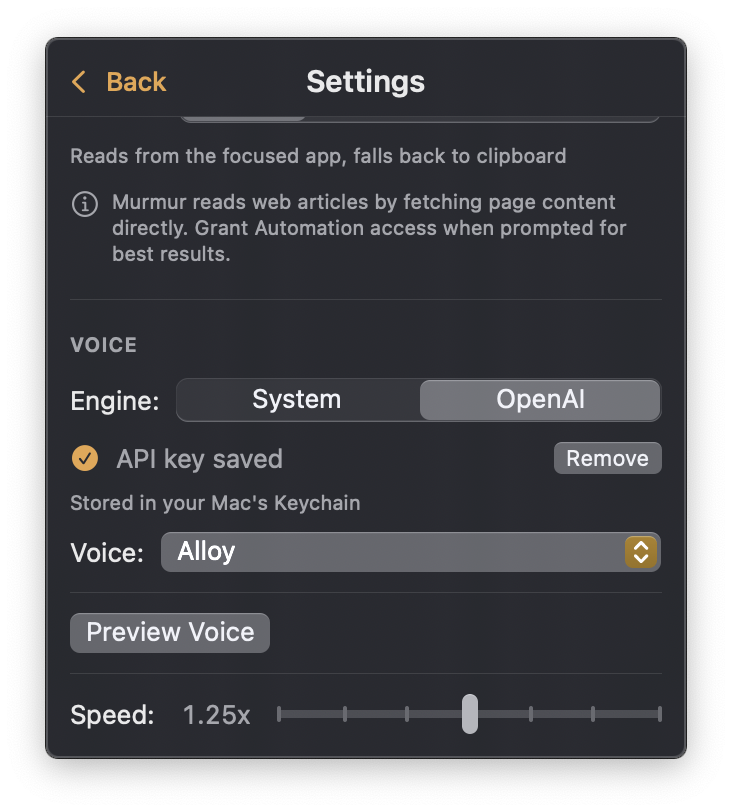
Murmur settings panel with OpenAI voice engine selected
Settings with OpenAI TTS

Your text, read aloud

Murmur lives in your menu bar and turns any on-screen text into speech — instantly.

⌨️

Global Hotkey

Press ⌘⇧L from anywhere to start reading. Fully customizable in settings.

🔍

Smart Extraction

Reads the focused text in any app via the Accessibility API — with clipboard as a fallback.

🌐

Browser Aware

Extracts article content directly from Safari and Chrome, skipping ads and navigation.

🎤

Two Voice Engines

System voices for instant, free playback — or OpenAI TTS for studio-quality speech.

Menu Bar Native

No dock icon, no windows — just a discreet menu bar panel. Stays out of your way.

🔒

Privacy First

System voice means zero network calls. OpenAI is opt-in — your text stays on your machine by default.

Two ways to listen

Murmur intelligently reads from the focused app — or falls back to your clipboard. Either way, it's one action.

1 Read the Focused App

  • Press ⌘⇧L from any app
  • Murmur detects the focused window and extracts its text
  • In Safari and Chrome, it pulls the article — not the chrome
  • Text is read aloud — press again to stop

2 Read Your Clipboard

  • Copy any text to your clipboard
  • Click Read Clipboard in the menu bar
  • Murmur reads the copied text aloud
  • Pause, resume, or stop anytime

Two engines, your choice

Use the built-in system voice for free, offline speech — or bring your own OpenAI API key for studio-quality TTS.

System Free

Apple's built-in AVSpeechSynthesizer

  • Works instantly with no setup
  • Completely offline — no data leaves your Mac
  • Choose from all installed macOS voices
  • Adjustable speed from 0.5x to 2x

OpenAI TTS BYOK

High-quality cloud voices via the OpenAI API

  • Natural, studio-quality speech
  • Multiple voice options (Alloy, Nova, Shimmer, and more)
  • Bring your own API key — stored in your Mac's Keychain
  • Pay only for what you use via your OpenAI account
Bring Your Own Key. Murmur never collects or proxies API keys. Your key goes directly from your Keychain to OpenAI.

Release notes

Every change that shipped, in plain language. Full commit history lives on GitHub.

v0.2.0 Latest August 6, 2026

A reliability release. Long articles now read all the way through, cloud playback recovers from network hiccups instead of dying mid-sentence, and browser extraction can't hang the app anymore.

Added

  • OpenAI's Marin and Cedar voices.
  • A one-command release pipeline covering versioning, validation, notarization, and publishing.
  • Unit tests for speech chunking and long-text cleanup.

Fixed

  • Long articles read up to 100,000 characters instead of silently stopping at 10,000.
  • OpenAI speech input is split below the API limit, even for unusually long sentences.
  • Transient OpenAI and network failures retry before playback starts, instead of aborting the article.
  • Streaming audio uses bounded buffering, real completion callbacks, and a stall watchdog.
  • Browser extraction is cancellable, targets the originally focused app, and bounds its waits.
  • System voice playback queues long text safely and ignores stale cancellation callbacks.
  • API key settings only report success when the Keychain write actually succeeds.
  • Settings expand to show the full form without an internal scroll area.
  • Debug builds no longer reset the Accessibility permission automatically.
  • Release builds pin SwiftSoup 2.13.7 to dodge a Swift optimizer crash in Xcode 27.
  • DMG packaging avoids file-lock races on mounted app bundles.
v0.1.0 Initial release — menu bar app, global hotkey, universal text extraction, system and OpenAI voices. March 25, 2026

Get started in seconds

Download the app or build from source. No external runtime dependencies.

Download DMG

Download, open, and drag to Applications.

Download Murmur v0.2.0

What's new in v0.2.0

Build from Source

Clone the repo and build with Xcode. Requires Xcode 26+ and xcodegen.

git clone https://github.com/arvindang/murmur.git
cd murmur
brew install xcodegen
xcodegen generate
xcodebuild -project Murmur.xcodeproj -scheme Murmur

System requirements

Murmur is a lightweight native app with minimal requirements.

Operating System

macOS 15 Sequoia or later

Apple Silicon

Disk Space

Less than 10 MB

No runtime dependencies

Permissions

Accessibility (recommended)

Required for smart text extraction

Build Requirements

Xcode 26+ & xcodegen

Only needed if building from source

Stop reading.
Start listening.

Murmur is free, open source, and built for people who'd rather listen.

Download for macOS Star on GitHub